
Deployments vs StatefulSets: When to Use Each in Kubernetes
One of the most common early questions in Kubernetes is:
Should I use a Deployment or a StatefulSet?
They look similar at first glance — both manage pods, replicas, and updates — but they are designed for very different types of workloads. Choosing the wrong one can lead to unnecessary complexity or broken applications.
This post breaks down what each controller is for, how they differ, and when you should use one over the other.
What Problem Do These Controllers Solve?
In Kubernetes, you rarely create pods directly.
Instead, you define a controller that:
- Creates pods
- Replaces them if they fail
- Scales them up or down
- Handles updates safely
Deployments and StatefulSets are two of the most common workload controllers — but they serve different purposes.
Deployments: Stateless, Scalable Workloads
A Deployment is the default choice for most applications.
What Deployments Are Good At
Deployments are designed for stateless workloads, where:
- Any pod can handle any request
- Pods are interchangeable
- Losing a pod does not lose data
Examples:
- Web frontends
- APIs
- Microservices
- Background workers
Key Characteristics of Deployments
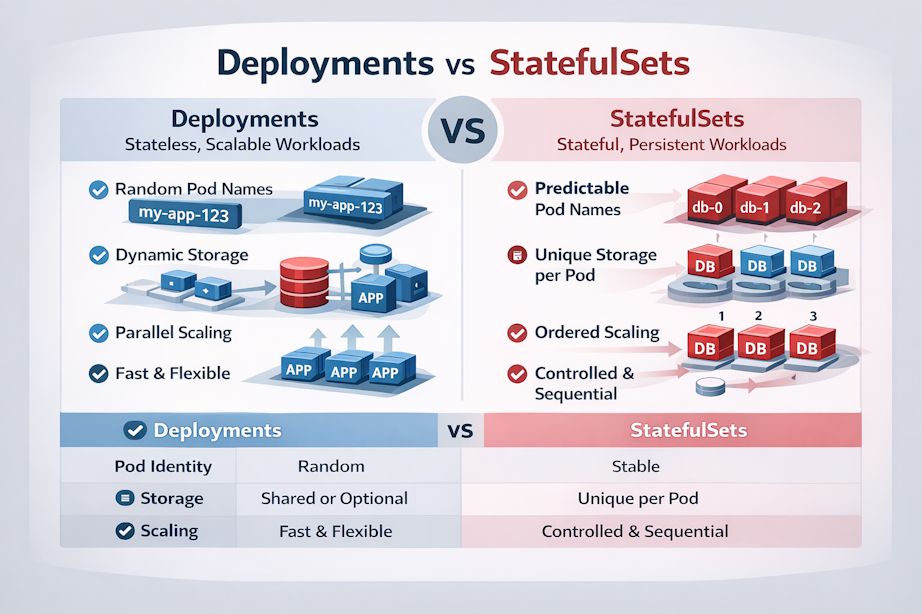
- Pods are identical and interchangeable
- Pod names are randomized
my-app-5f8d6b9d6f-x7k2m
- Pods can be created or destroyed in any order
- Rolling updates are simple and fast
- Scaling is trivial
If Kubernetes kills and recreates a pod, the application shouldn’t care.
Typical Deployment Use Case
apiVersion: apps/v1
kind: Deployment
spec:
replicas: 3You’re saying:
“I want three copies of this application running at all times.”
Which pod handles which request doesn’t matter.
StatefulSets: Identity and Order Matter
A StatefulSet is designed for stateful workloads, where identity, ordering, and persistence are important.
What StatefulSets Are Good At
StatefulSets are used when:
- Each pod needs a stable identity
- Each pod needs its own persistent storage
- Startup and shutdown order matters
Examples:
- Databases (PostgreSQL, MySQL, MongoDB)
- Distributed systems (Kafka, ZooKeeper, etcd)
- Applications with leader/follower roles
Key Characteristics of StatefulSets
- Pods have stable, predictable names
db-0
db-1
db-2- Each pod keeps its identity across restarts
- Each pod typically gets its own PersistentVolume
- Pods are created and deleted in order
- Scaling is controlled and deliberate
If db-1 dies, Kubernetes recreates db-1, not a random replacement.
Typical StatefulSet Use Case
apiVersion: apps/v1
kind: StatefulSet
spec:
replicas: 3But unlike a Deployment:
db-0,db-1, anddb-2are distinct- Each has its own storage and network identity
The Core Differences (Side by Side)
| Feature | Deployment | StatefulSet |
|---|---|---|
| Pod identity | Random | Stable |
| Pod names | Dynamic | Predictable |
| Storage | Shared or optional | One volume per pod |
| Startup order | Parallel | Ordered |
| Scaling | Fast and flexible | Controlled and sequential |
| Best for | Stateless apps | Stateful systems |
Storage: The Deciding Factor
If your application:
- Does not require persistent storage → Deployment
- Requires unique, durable storage per instance → StatefulSet
StatefulSets commonly use:
- VolumeClaimTemplates
- One PersistentVolume per replica
Deployments can use storage, but:
- All replicas usually share it
- Identity is not preserved
Networking Differences
Deployments typically sit behind:
- A Service that load-balances traffic
StatefulSets often use:
- A Headless Service
- Direct pod-to-pod communication
- Stable DNS names like:
db-0.db.default.svc.cluster.localThis is critical for clustered systems.
Common Mistakes
❌ Using StatefulSets for Stateless Apps
This adds:
- Unnecessary complexity
- Slower scaling
- Harder updates
If you don’t need stable identity or storage — don’t use it.
❌ Using Deployments for Databases
This often leads to:
- Data loss
- Split-brain scenarios
- Hard-to-debug failures
Databases expect identity and stability.
How This Plays Out in OpenShift
OpenShift supports both controllers fully, but adds:
- Better storage integration
- Operator-based patterns for stateful apps
- Safer defaults for updates and security
In production OpenShift environments:
- Deployments dominate application workloads
- StatefulSets are used carefully and intentionally
- Many databases are deployed via Operators, which internally manage StatefulSets
Understanding StatefulSets helps you understand what Operators are doing under the hood.
Rule of Thumb
If you remember nothing else, remember this:
- Stateless app? → Deployment
- Needs identity or per-pod storage? → StatefulSet
When in doubt:
- Start with a Deployment
- Move to a StatefulSet only when requirements force you
What’s Next?
Future posts will cover:
- Deployments vs DaemonSets
- StatefulSets and storage classes
- Operators vs raw Kubernetes controllers
- Running databases safely on OpenShift
Final Thoughts
Deployments and StatefulSets solve different problems — neither is “better” than the other.
The key is understanding your application’s needs and choosing the controller that matches them.
Make Kubernetes work for you, not against you.